
Plenty of internal tools get built, launched, and quietly abandoned within a few months. The software usually works. People just go back to the spreadsheet.
That failure is predictable, which means it can be designed against. Below are the five patterns we see most, and what each one implies for how you commission a build.
1. Built for the person who commissioned it
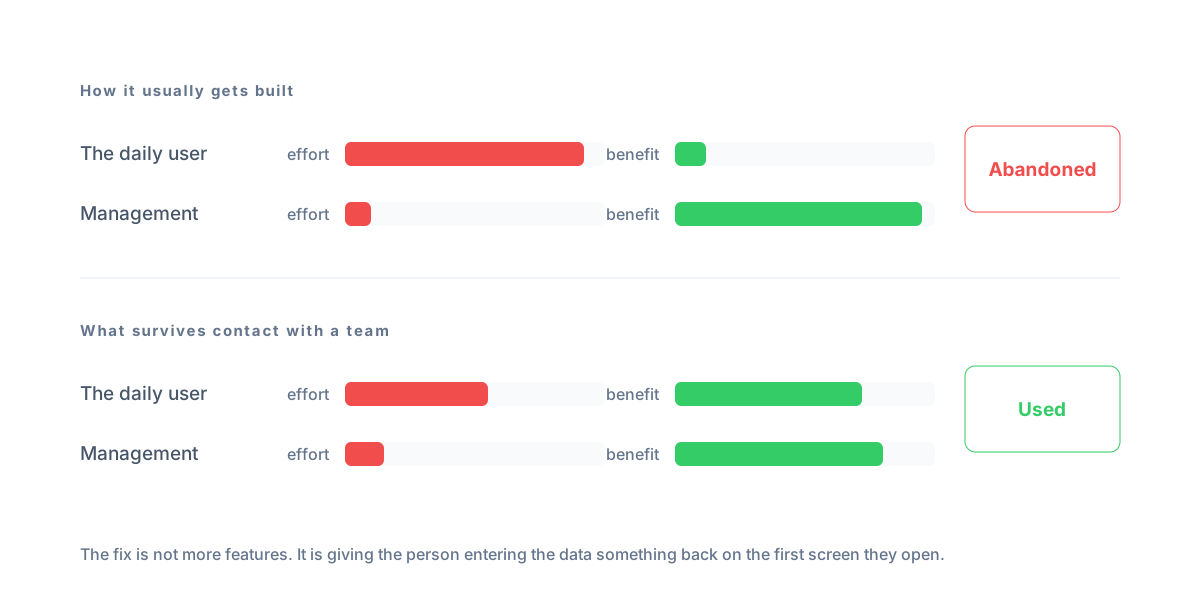
The most common failure by a wide margin. A director wants visibility, so the tool is designed around the reports the director wants to see. But the data has to be entered by people on the front desk or on site, who get nothing back for entering it.
The result is a tool that is pure cost to everyone who touches it and pure benefit to one person who does not. It gets used for about three weeks.
What to do instead: make sure the daily user gets something on the first screen they open. Their own workload, their own pipeline, their own day. Management reporting can be built on top of data that people have a reason to keep accurate.
2. Slower than the thing it replaced
A paper board takes one second to update. If marking a room clean takes six taps and a page load, the board wins, and it should.
This is why replacing an informal system is harder than replacing a formal one. Informal systems are fast, and speed is a real feature you are competing with.
What to do instead: for every action that happens more than a few times a day, count the interactions and compare against what people do now. If the new way is slower, it needs to be fixed before launch, not after.
3. Data entry with no payoff
Every field you ask someone to fill in is a small tax. Some fields are worth it because they come back as something useful. Others exist because someone thought the data might be handy one day.
Users can tell the difference, and a form with several pointless fields teaches people that the tool wastes their time.
What to do instead: for every field, be able to say what it is for and who uses it. If you cannot answer, cut it. You can always add it later, when there is a reason.
4. No owner after launch
A tool needs someone whose job includes it. Not a developer, but someone internal who fields questions, decides what changes, and notices when people quietly stop using a feature.
Without that person, small problems accumulate unaddressed until the tool feels broken, even though nothing technically failed.
What to do instead: name the owner before you build, and make sure they were involved in the scoping. Ownership handed over cold at launch does not stick.
5. The old system was never turned off
If the spreadsheet still exists, some people will keep using it. Then the two disagree, the tool becomes untrustworthy, and everyone returns to the file, which is now the only place with complete data.
Running both in parallel feels like a safe transition, and it is exactly how these builds die.
What to do instead: pick a date, migrate the data properly, and make the old file read-only. If you are not confident enough to do that, the tool is not ready, which is useful information.
What good adoption looks like
It is unremarkable. People open the tool because it is where their work is, not because they were told to. Nobody keeps a private copy. When somebody wants a change, they know who to ask. The old spreadsheet is gone and nobody misses it.
None of that comes from the software being impressive. It comes from the tool being faster than the alternative for the people who use it most.
The question to ask before you build
One question, asked of the person who will use it most, not the person paying: what would make this better than what you do now?
If they cannot answer, you do not yet know what to build. If they can, that answer is your specification, and it is worth more than any feature list assembled in a meeting.
Related: how to scope a first build so it is small enough to actually launch, and how to tell whether the spreadsheet is genuinely the problem.